
 Written by
Daniel van Hek
Search Clicks·September 5, 2026
11 min read
Written by
Daniel van Hek
Search Clicks·September 5, 2026
11 min read
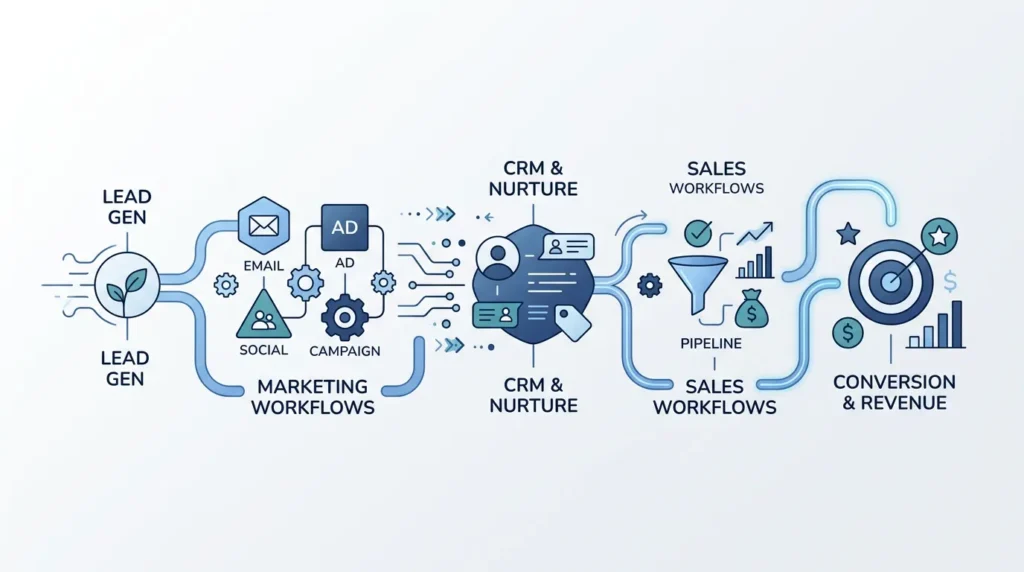
Process automation is making your work smarter. Not by working harder, but by letting repeatable steps in your online marketing and sales process run through software, workflows and integrations. Think of: lead intake, qualification, follow-up, reporting and updating CRM data. In short, we make the system do the boring work, so you can focus on what really makes a difference.
In practice, this works well because online marketing and sales are so “chain-like”. One form gets filled in, and then something has to happen: tagging, enriching, routing, following up, scheduling, measuring. If one link is slow, you lose leads, lower quality and make your reporting messy. Automation fills those gaps.
There’s also a mature nuance here. Automation does not magically fix bad targeting, vague ICP (Ideal Customer Profile) choices or unclear messaging. It only makes problems visible faster. That may sound like criticism, but it’s actually an advantage: you can improve faster because your data and follow-up become tighter.
Let’s make it practical. For most B2B and B2C companies, the gains are in three areas.
A lead is a person or company with potential commercial interest. But what you really need is speed and consistency toward Marketing Qualified Lead and Sales Qualified Lead. Automation helps by standardising the process.
Strategic advantage: you reduce “time to first response”. Tactical advantage: you make your lead process measurable. If you later try to optimise it, you’ll know exactly where the delay is.
Many teams do measure. But they don’t always adjust based on what is actually happening with leads. Process automation makes CRO (Conversion Rate Optimization) concrete by linking data and actions.
Important: automation cannot decide what “the best version” is. It can, however, make sure tests start faster and results come back into your backlog sooner.
Reporting is often the silent culprit. Too late, incomplete, or only useful for one team. With process automation, you make reporting part of the process, not an afterthought.
We stay sharp here that automated systems should not make unauthorised budget changes or contractual commitments without human review. That is not only sensible, it also keeps you compliant.
There’s a reason good automation feels like a smoothly running system. You don’t just see tools, you see a workflow design. NIST describes workflow as specified tasks and dependencies that are synchronised within a workflow management context. That is exactly what you want: clear which step happens when, and which input is needed. Source: NIST glossary on workflow management system. (csrc.nist.gov)
Don’t start by “automating everything”. Choose one process that is currently demonstrably underperforming. Good candidates:
We ask your team one thing: where does the process break, and how often does that happen per week? If you can’t answer that, we first automate observation, not execution.
Automation is strongest when your definitions are tight. So we model the process in statuses, for example:
This is where expertise comes in. You don’t just want to automate what you do now. You also want to standardise how you decide, so your data is correct later.
We like automating, but we are honest about limitations. There are two types of risk:
For privacy, human oversight is important. GDPR rules around automated decision-making and safeguards are widely discussed in case law and literature. Without going into legal details, the starting point is: avoid having essential decisions taken fully automatically and without any human ability to review them. (Article 22 GDPR is often treated in this context.) (doi.org)
Practical translation for marketing and sales: let the system prepare leads and make suggestions. Let people decide on budget decisions, contractual actions and other high-impact steps.
If your automation works, you also want to measure it. But measurements often fail because of data quality and data management. Google Analytics 4, for example, provides data retention settings, so event-level and user-level data are automatically deleted after a certain period. (support.google.com)
We recommend doing this upfront, before you put automation live. Otherwise you build a nice system on data that later is no longer available for analysis or reporting.
Want to bring data modelling and privacy together? Then set clear rules for:
Okay, theory is nice. So here’s the implementation plan. You can roll this out in phases over 30 to 60 days, as long as input and decision-making are organised.
We build a workflow that runs your process, but with controlled outcomes.
Why this works: you reduce damage. You learn quickly, without immediately routing your entire lead stream incorrectly. Yes, that’s boring. But that’s how your “go live” stays a celebration and not a survival game.
Now the automation can do more, within your governance. This is where we bring marketing and sales together.
Watch the trade-off: more automation means more complexity. The goal is not “as many rules as possible”, but “as many consistent steps as possible with human control where it matters”.
If you’ve experienced this, you’ll recognise it immediately. So here are the top mistakes, with a practical fix.
If nobody is responsible for the workflow, maintenance becomes an afterthought. Fix: appoint one process owner from marketing and one from sales. Not for prestige, but for decisions.
Then you get reports that “match” on numbers, but not on meaning. Fix: define Marketing Qualified Lead and Sales Qualified Lead, including criteria and exceptions.
Then later you measure something different from what you automated. Fix: design tracking and data retention upfront. Google Analytics 4, for example, has data retention settings that determine how long event-level and user-level data is kept. (support.google.com)
For high-impact decisions, you want human review. Especially with automated decision-making, rules around appropriate safeguards, including human intervention and contesting the outcome, play a role in how it is viewed legally. (doi.org)
Fix: automate routing and follow-up, but let people confirm budget, contract or deal decisions.
Process automation is not just about back office. It is a bridge between acquisition and revenue. That’s why, in a second phase, we connect SEO and Search Engine Advertising to the lead process.
SEO often brings traffic. What you want are leads that fit your ICP. Automation can help by translating content intent into segments in your CRM. Not through “magic”, but through clear mapping: which pages and search intent fit which offer or sales route.
If you want to structure this, it helps to broaden your lead strategy, for example via Lead Generation: Complete Strategy for More Customers.
For Search Engine Advertising, you don’t just want clicks, but conversions in the right funnel. Automation can create reports, but the core is: define which KPIs you steer on, and who decides when there are deviations.
If you are starting or refreshing Google Search campaigns, this is a useful route: Google advertising: getting started with Google Ads in 2026.
We always set up a simple regime:
This is dull, but it prevents automation from slowing down your marketing and sales instead.
If you make one decision today, make it this one: choose one process automation use case that makes your lead flow faster and more consistent. Put it live in safe mode first. And only then expand.
Concretely, our advice for your next step:
And if you want support with setting up or sharpening online marketing and sales, you can use these internal guides as preparation, so you know which questions to ask:
Final note with a bit of dry humour: automation is not a chainsaw. It’s a plane. If your rules are sharp, you get a much smoother process. If they aren’t, it only smooths your problems faster. And that’s a shame, because we want you moving faster toward real growth.
Book a free strategy call and discover how many leads we can generate for your business. No obligations — just a concrete growth plan.
Book your free strategy call → Book your free strategy call — 30 min, no strings attached